
Top 10 visual studio code extensions 2020

Visual Studio Code (aka VS Code ) is “a lightweight but powerful source code editor which runs on your desktop and is available for Windows, macOS and Linux” and here are some extensions that can make your vscode more powerful.
Free ReactJs book https://amzn.to/2ZOfxJo ! Grab Now
1. Live Server

Linux sysadmins would often require to create a live server in their system for monitoring several things in action. The Live Server extension can be used for setting up a local development server that will allow programmers to test out newly created static and dynamic pages effortlessly. The go-live button present in the taskbar will enable you to run your code as a development server directly, while you can also configure the extension to reload pages as soon as you save your current work.
Source: https://www.ubuntupit.com/best-visual-studio-code-extensions-for-programmers/
Download: Live Server
2. Prettier
Prettier is one of the best VS code extensions for modern-day web designers who need to follow a well-laid set of rules when designing their pages. It is a compelling extension which allows them to utilize the popular Prettier package. It is a robust opinionated code formatter that allows designers to format their codes in a structured way. Prettier works together with JavaScript, TypeScript, HTML, CSS, Markdown, GraphQL, and other modern tools and allows the creation of cutting-edge apps effortlessly.
Source: https://www.ubuntupit.com/best-visual-studio-code-extensions-for-programmers/
Download: Prettier
3. Quokka
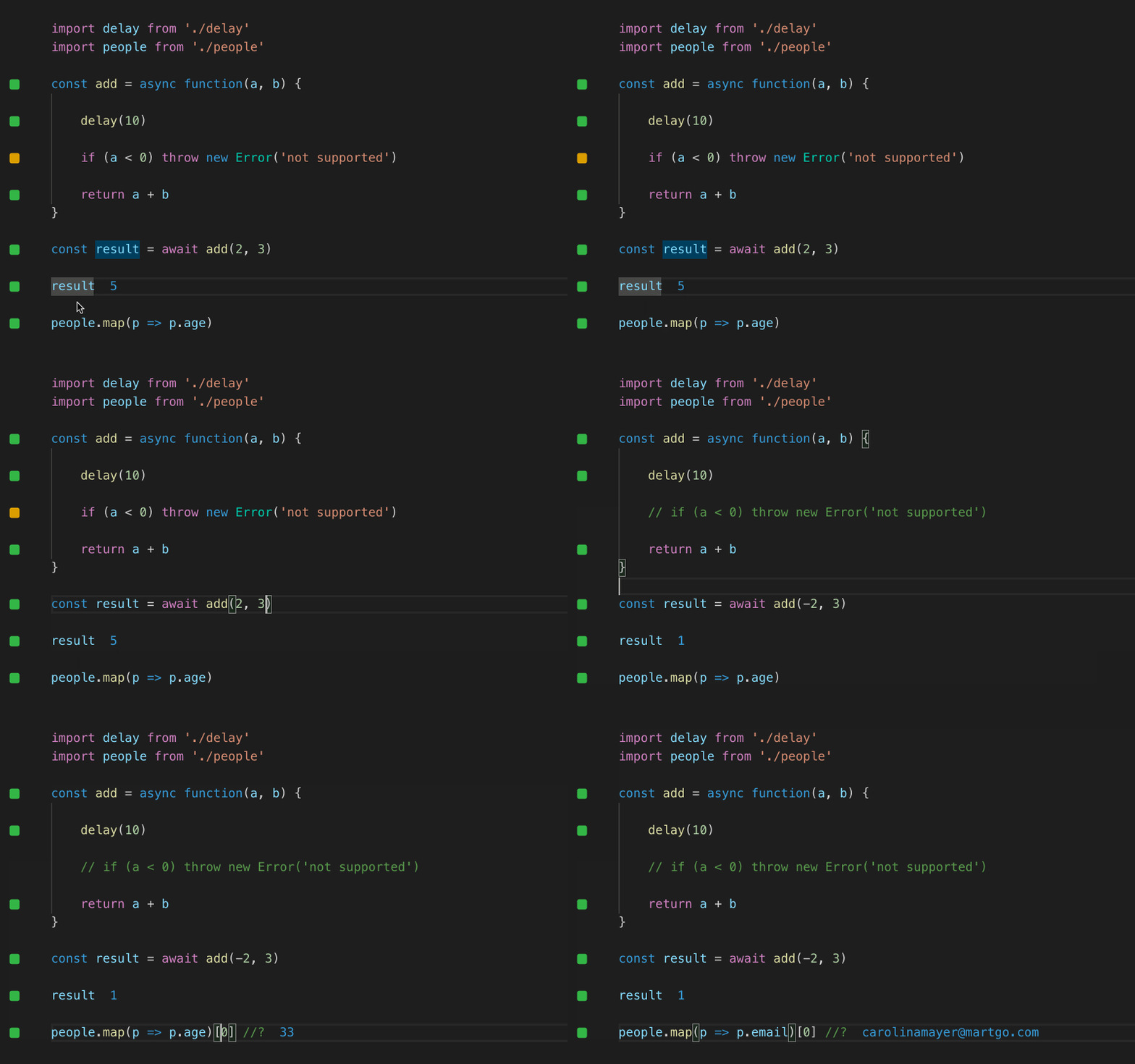
Quokka.js is a robust, modern-day scratchpad for JavaScript developers who work on the VS Code for their projects extensively. It’s one of the most lightweight yet productive vscode extensions you can use to boost your workflow. Quokka checks your JavaScript code in real-time and provides instant feedback on which blocks have been already executed and which aren’t. If you’re looking for a JS extension to save your time spent behind code checks, Quokka is the solution for you.
Source: https://www.ubuntupit.com/best-visual-studio-code-extensions-for-programmers/
Download: Quokka
4. Es Lint
Integrates ESLint into VS Code. If you are new to ESLint check the documentation.
The extension uses the ESLint library installed in the opened workspace folder. If the folder doesn’t provide one the extension looks for a global install version. If you haven’t installed ESLint either locally or globally do so by running npm install eslint in the workspace folder for a local install or npm install -g eslint for a global install.
On new folders, you might also need to create a .eslintrc configuration file. You can do this by either using the VS Code command Create ESLint configuration or by running the eslint command in a terminal. If you have installed ESLint globally (see above) then run [eslint --init](http://eslint.org/docs/user-guide/command-line-interface) in a terminal. If you have installed ESLint locally then run [.\node_modules\.bin\eslint --init](http://eslint.org/docs/user-guide/command-line-interface) under Windows and [./node_modules/.bin/eslint --init](http://eslint.org/docs/user-guide/command-line-interface) under Linux and Mac.
Source: https://marketplace.visualstudio.com/items?itemName=dbaeumer.vscode-eslint
Download: Es Lint
5. Git Lens

Git Lens is an awe-inspiring opensource extension for Visual Studio Code which will make contributing to third-party projects easier than ever. It allows users to take full control of the Git capabilities built into Code and aims to increase productivity to its peak. Thanks to features like Git blame annotations and code lens, understanding a new codebase will take the least amount of your valuable time.
Source: https://www.ubuntupit.com/best-visual-studio-code-extensions-for-programmers/
Download: Git Lens
6. Bracket Pair Colorize

The Bracket Pair Colorizer extension is one of the most productive Visual Studio Code extensions for frequent programmers. If you are like me and often find yourself falsely navigating through those confusing curly brackets when inspecting branches of code; this one is a must-have for you. It allows the editor to identify matching brackets with colours you can define and configure. So, it enables you to know the depth of a code branch by merely having a look at the respective bracket’s colour.
Source: https://www.ubuntupit.com/best-visual-studio-code-extensions-for-programmers/
Download: Bracket Pair Colorize
7. Polacode

Polacode is my favourite extensions that let you screenshot your code with very beautiful vscode theme. With polacode you can share your code over Instagram or any other social media platforms as an image
Just hit: command + p and type “Polacode”
Download: Polacode
8. Better Comments

The Better Comments extension will help you create more human-friendly comments in your code. With this extension, you will be able to categorise your annotations into:
Alerts
Queries
TODOs
Highlights
Commented out code can also be styled to make it clear the code shouldn’t be there
Any other comment styles you’d like can be specified in the settings
Download: **Better Comments**
9. REST Client

REST Client allows you to send HTTP request and view the response in Visual Studio Code directly.
Usage: Open a blank file and type:
GET https://jsonplaceholder.typicode.com/todos/1
and press CMD + option + R ( MacOs ) or Ctrl + Alt + R (Windows )
Download: REST Client
10. Markdown all in one
All you need to write Markdown (keyboard shortcuts, table of contents, auto preview and more)
Source: https://marketplace.visualstudio.com/items?itemName=yzhang.markdown-all-in-one
Download: Markdown All in one
Must have a laptop for programmers https://amzn.to/2ZOfxJo
Comments
Join the discussionI was fond of TODO Highlight and Regex Previewer, when I was a CS student 2 years ago. Now, I'm using Code Spell Checker mostly for my custom coding tasks and open source projects which I do for free. My portfolios with CS and Programming courses https://cheapessaywriter.co.uk/


